Error Message: Stream has not started yet.
When livestreaming, using an IP Camera (a chapel cam, church cam, Mevo cam, pro videographer, etc.), and controlling the broadcast from the Director panel in Foveo.app (left menu: Streams > List > [Stream Name] > DIRECTOR (right end of selected line), you may see a message in the Broadcast viewer during the broadcast that says: "Stream has not started yet."
When livestreaming, using an IP Camera (a chapel cam, church cam, Mevo cam, pro videographer, etc.), and controlling the broadcast from the Director panel in Foveo.app (left menu: Streams > List > [Stream Name] > DIRECTOR (right end of selected line), you may see a message in the Broadcast viewer during the broadcast that says: "Stream has not started yet."
This error message comes directly from our streaming server. It indicates your internet connection was interrupted. As a result, the broadcast for online guests was also likely interrupted.
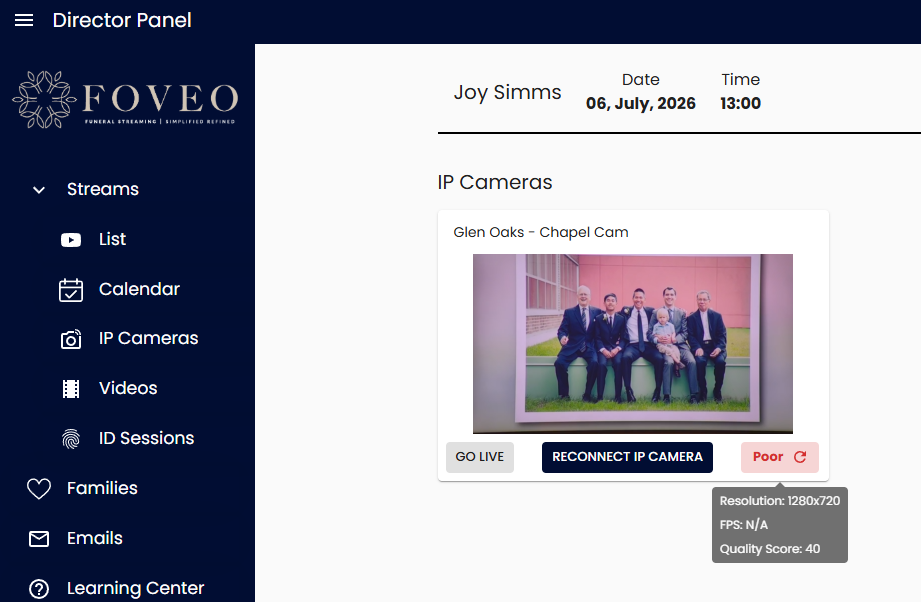
To quickly resolve this issue and resume the broadcast, click on the "Reconnect IP Camera" button under the IP Cameras preview pane (see image below).
To quickly resolve this issue and resume the broadcast, click on the "Reconnect IP Camera" button under the IP Cameras preview pane (see image below).
Note: If the RECONNECT button does not resolve the issue for you within 30 seconds, please text or call our DirectorCare team. Ask them to RESET your IP Camera's connection. At the same time, stop streaming to Foveo from your encoder (i.e., OBS Studio, Yolo, etc.), but DO NOT END the broadcast. Once your IP Camera's connection has been reset by Foveo, start streaming again from your encoder.
Backgrounder: The Quality of your Internet Connection Matters
The signal strength and reliability of your internet connection has the biggest impact on the quality of your livestream broadcasts. Foveo constantly assesses the quality of your IP Camera's local internet connection (i.e., Good, Fair, Poor) and provides details about the quality of your connection.
Simply hover your cursor over the stream quality indicator under the right corner of a live IP Cameras viewer to discover whether your internet connection might falter during the broadcast (see image below).
Understanding that your internet connection is either Good or Fair can add significant peace-of-mind, knowing your livestream broadcast is unlikely to fail or falter.